01Quick start
Two minutes from installed to playing something you would keep.
- Install. Run the installer. It places the Audio Unit in
/Library/Audio/Plug-Ins/Componentsand the VST3 in/Library/Audio/Plug-Ins/VST3. Restart your DAW afterwards — hosts cache their plug-in list. - Open a preset. Click the display at the top of the panel. The browser opens with all 153 factory sounds, grouped into collections down the left. Type in the search box to filter by name; click a star to keep a favourite.
- Play, then move the four macros at the top right. In every factory preset they are mapped to what actually matters in that sound — the names above them change per preset.
- Turn CUTOFF. It is the biggest knob on the panel for a reason. With resonance up it sings, and near maximum it self-oscillates.
- Save your version. The disk icon beside the display saves, imports and exports patches.
02The panel at a glance
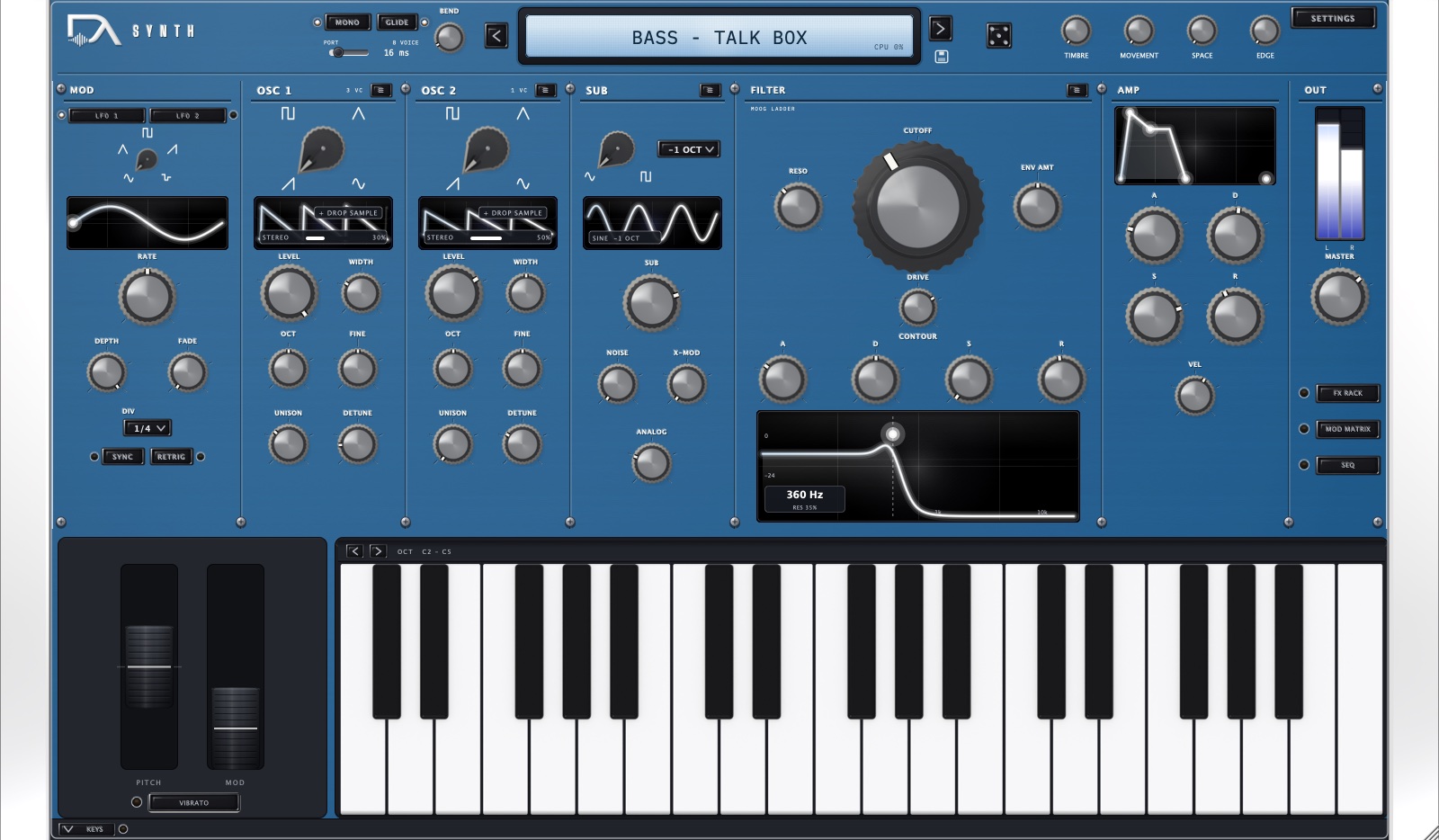
Signal flows left to right: the sources feed the filter, the filter feeds the amplifier, and the FX rack sits at the end of the chain.
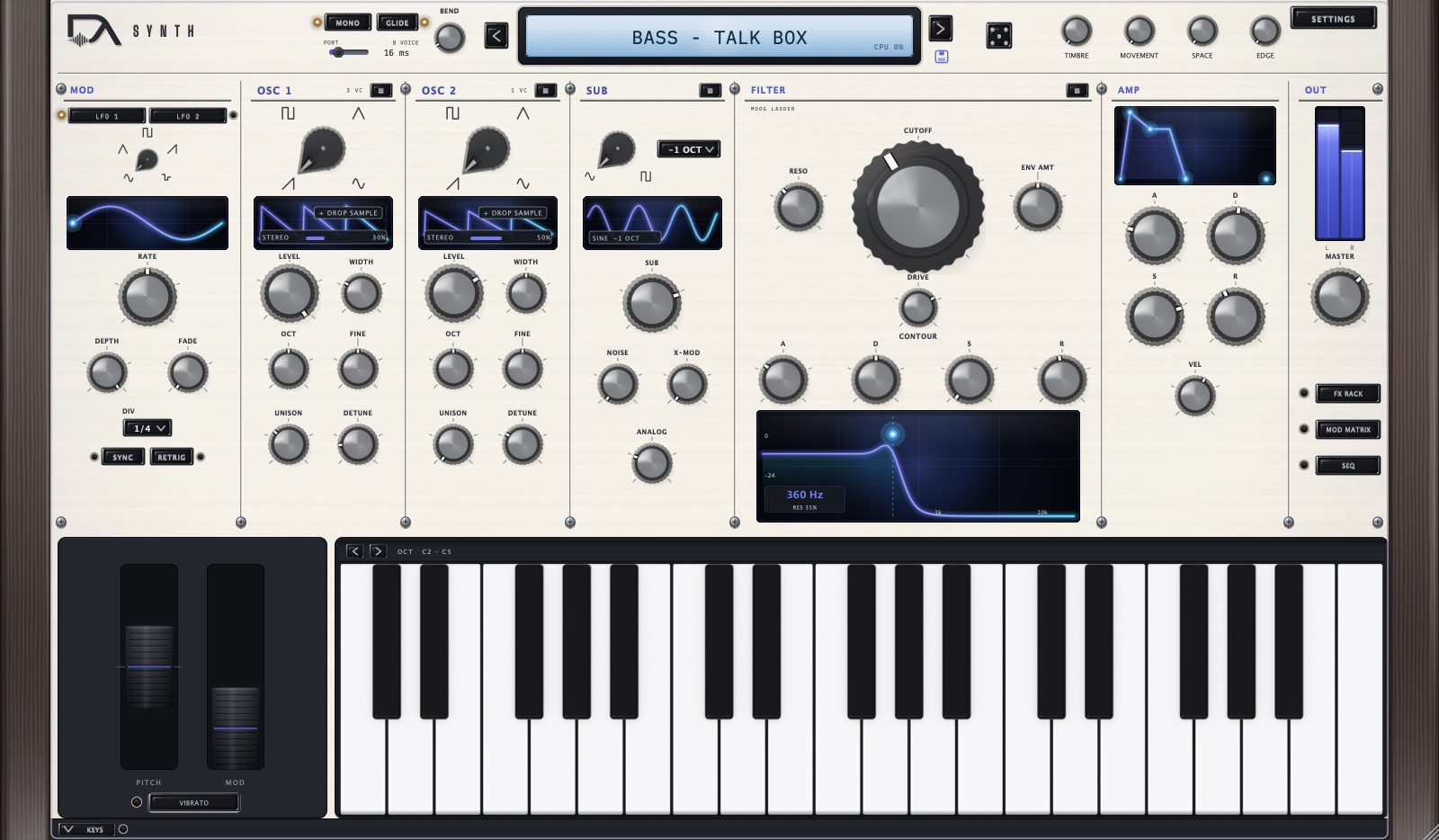 12345678910
- 1Display — the preset name, the arrows step through your current filter, and any control you touch names itself here for a moment.
- 2Macros — four knobs wired differently in every factory preset. Start here.
- 3MOD — two LFOs, one shown at a time.
- 4OSC 1 and OSC 2 — the two main oscillators, side by side, each with unison and a sample slot.
- 5SUB — sub oscillator, noise, and cross-modulation.
- 6FILTER — the ladder, its envelope and the response curve.
- 7AMP — amplitude envelope and velocity depth.
- 8OUT — master level, meters, and the three page buttons: FX RACK, MOD MATRIX, SEQ.
- 9Wheels — pitch (sprung), mod, and the VIBRATO arm.
- 10Keyboard — click to play; the arrows shift the octave range.
Three buttons in the OUT column swap the middle of the panel for another page: FX RACK, MOD MATRIX and SEQ. The keyboard and the wheels stay put, so you can keep playing while you edit.
03Sound sources
Oscillators 1 and 2
Each oscillator offers Saw, Pulse, Triangle and Sine, an octave (−2 to +2), coarse tuning in semitones (±12) and fine tuning in cents (±100). PWM sets pulse width, and it is the classic destination for an LFO.
Unison stacks up to seven copies of the oscillator; Detune spreads them apart and Spread places them across the stereo field. A supersaw is Saw, unison 7, detune around a third up, spread wide.
Drop a sample. The waveform display in each oscillator is also a drop target — drag an audio file onto it and the oscillator switches to Single-Cycle mode, playing your file as its waveform.
Sub and noise
The sub oscillator plays a Sine or Square one or two octaves below Osc 1, and it is the fastest way to weight a bass patch. Noise is White or Pink.
Cross-modulation
Three ways to make the oscillators interact, all in the SUB panel:
- FM (2→1)
- Osc 2 frequency-modulates Osc 1. Small amounts add bite; large amounts go metallic. Anti-aliasing for this follows the Quality setting.
- Ring Mod
- Ring modulation between the two oscillators — inharmonic, bell-like.
- Osc2 Sync
- Hard sync: Osc 2 restarts with Osc 1. Sweep Osc 2's pitch with an envelope for the classic sync lead.
04Filter and envelopes
The filter is a nonlinear four-pole ladder with four modes: LP24 (the default, 24 dB per octave), LP12, HP and BP.
- Cutoff
- 20 Hz to 20 kHz. Defaults to 10 kHz.
- Resonance
- Emphasis at the cutoff. It sings as it rises and self-oscillates cleanly near maximum — with everything else down, the filter becomes a sine source you can play.
- Drive
- Pushes the saturating stages. This is where the ladder's warmth comes from; it compresses and adds harmonics as you raise it.
- Key Track
- How much the played note opens the filter, so high notes stay as bright as low ones.
- Env Amt
- How far the filter envelope moves the cutoff. It is bipolar: negative values make the envelope close the filter instead of opening it.
The two envelopes
Both are ADSR. The filter envelope shapes the cutoff through Env Amt; the amp envelope shapes level. VEL in the AMP panel sets how much your playing velocity affects loudness.
05Modulation
The two LFOs
Each LFO has five shapes — Sine, Triangle, Saw, Square, S&H — a rate from 0.01 to 40 Hz, a depth, and a Fade of up to five seconds that eases the LFO in after each note. Switch SYNC on and the rate follows the host tempo instead, in divisions from 1/1 to 1/16T. RETRIG restarts the LFO with every note.
The MOD panel shows one LFO at a time; the LFO 1 / LFO 2 selector switches which.
The mod matrix
Eight slots, each one source, one destination, one amount from −1 to +1. Open it with MOD MATRIX in the OUT column.
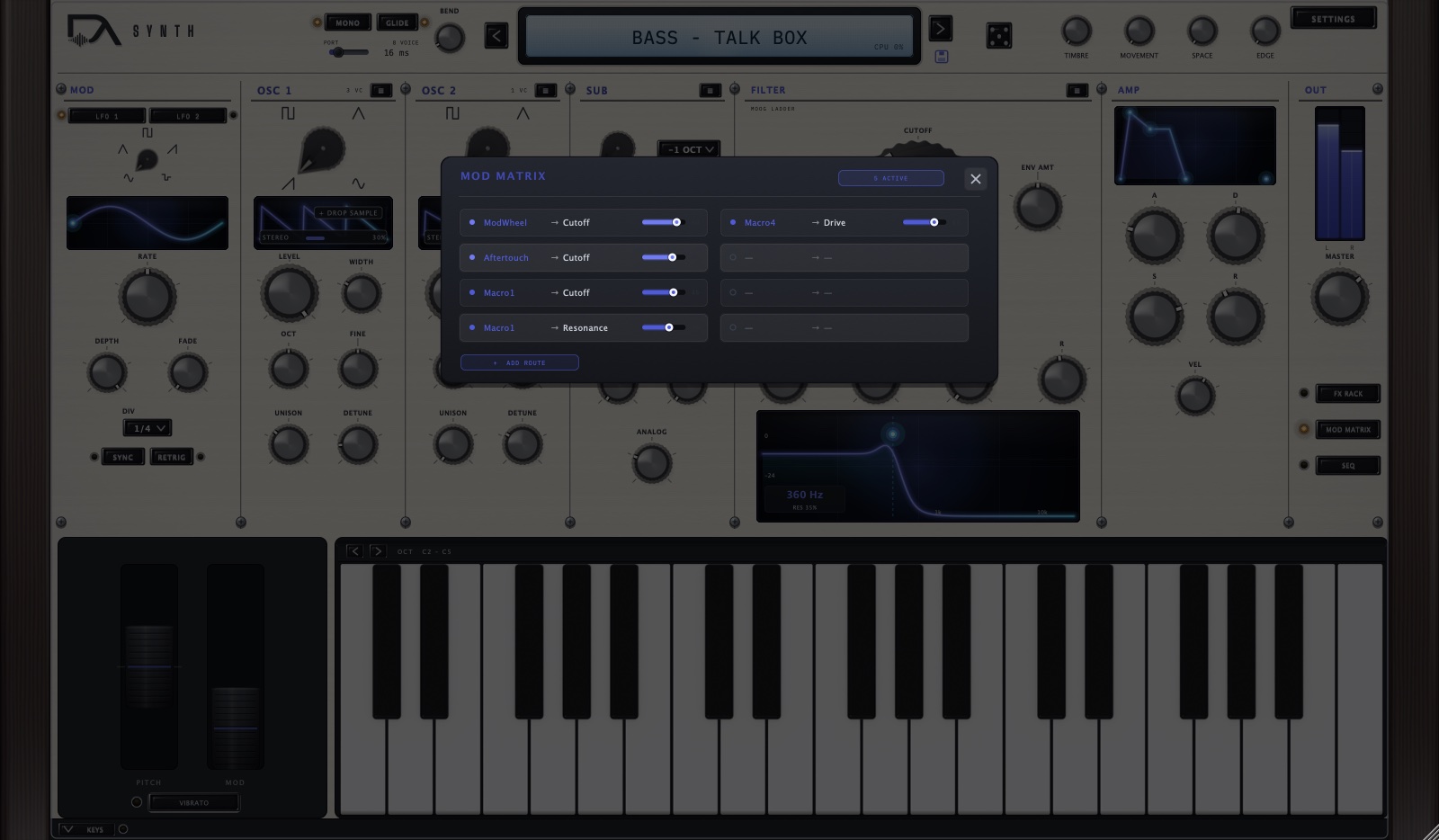
Sources (12)
Env 1, Env 2, LFO 1, LFO 2, Velocity, Mod Wheel, Aftertouch, Key Track, Macro 1–4.
Destinations (20)
Osc 1 / Osc 2 Pitch, Osc 1 / Osc 2 Level, PWM, FM Amount, Cutoff, Resonance, Drive, Amp, Pan, LFO 1 / LFO 2 Rate and Depth, Macro 1–4, and Osc 2 Sync.
Three routings worth knowing
- Velocity → Cutoff — harder playing opens the filter. Every factory preset uses some version of this.
- LFO 1 → PWM at a slow rate — the classic moving-pulse pad.
- Env 2 → Osc 2 Pitch with Osc2 Sync on — the sync sweep.
06Performance
Chord memory
One key plays a whole chord. Turn on CHORD on the SEQ page, then choose how the chord is built:
- Diatonic — the chord follows the scale set by Scale Lock, so a white-key run stays in key.
- Fixed type — every key plays the same shape, from 14: Maj, Min, 7, Maj7, Min7, Sus2, Sus4, Add9, 6, 5 (Power), and the four rootless voicings m9, maj9, 9 and 13. Rootless chords leave the root out for the bass to cover — that is what makes them sound like a record rather than a chord chart.
Voicing offers Root, 1st Inversion, 2nd Inversion and Open. 7th adds the seventh to diatonic chords. Strum spreads the notes in time, up or down, up to a few tens of milliseconds.
ROLL decides how a sequenced chord sounds. Off, the chord lands as a block. On, its notes are rolled across the step in the order set by ARP ORD, which turns a progression into a moving figure without a second sequencer. Up-Down and Down-Up alternate direction from one step to the next; As Played reads as Up, because these notes were built by the chord engine rather than pressed.
Scale lock
SCALE LOCK snaps played and sequenced notes into a scale: Major, Natural Minor, Harmonic Minor, Dorian, Phrygian, Mixolydian, Lydian, Minor Pentatonic, Major Pentatonic or Chromatic, in any of the twelve roots.
Sequencer and arpeggiator
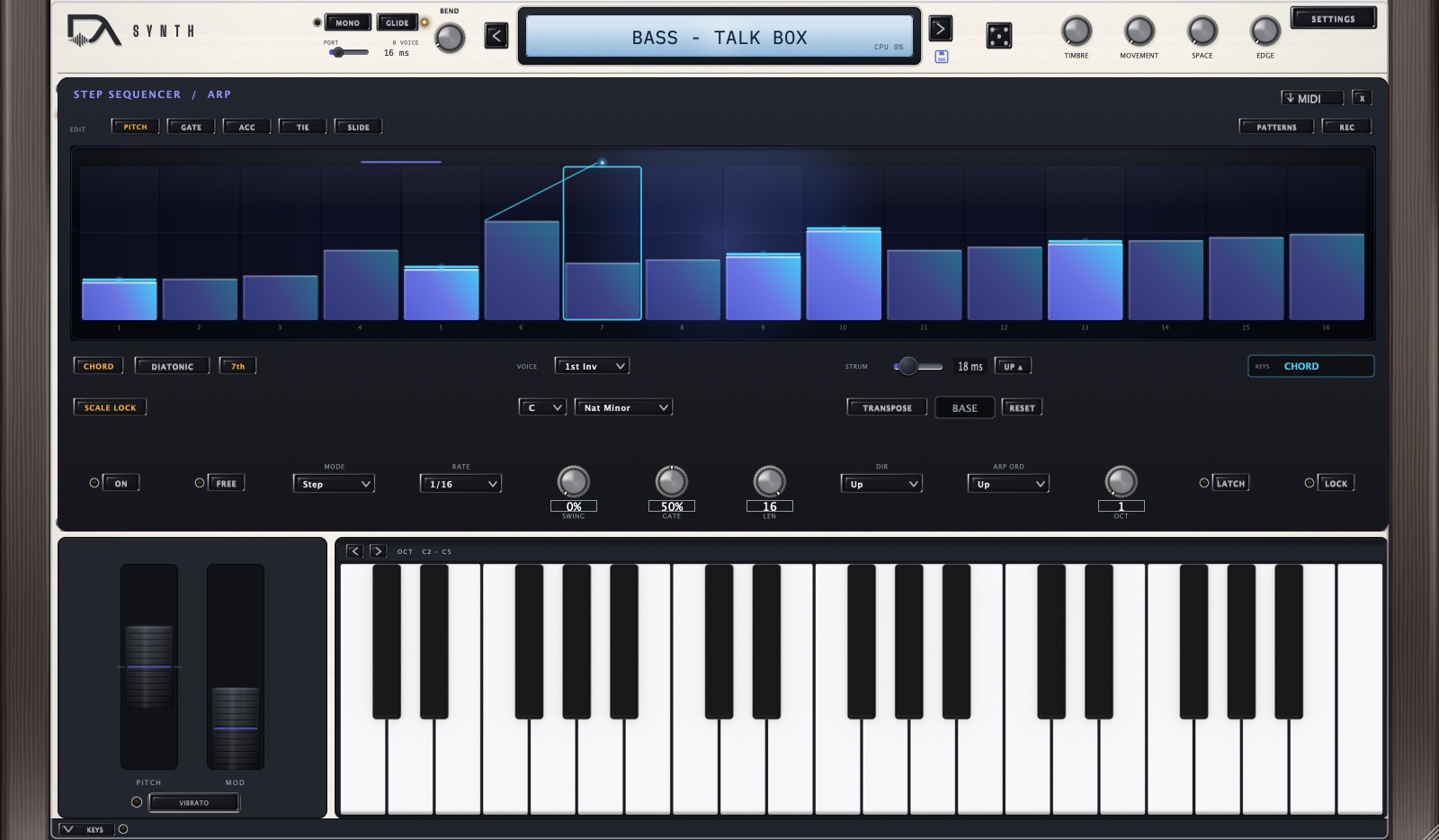
One page, two behaviours, chosen with MODE:
- Step — a sixteen-step sequencer. Each step has a pitch, a gate, the ACC (accent), TIE and SLIDE flags, and its own chord type. Pick the lane you want to edit with the buttons above the grid, then drag in the grid. PATTERNS holds six starting patterns and Clear.
- Arp — plays the notes you hold, in one of seven orders: Up, Down, Up-Down, Down-Up, As Played, Random and Chromatic. OCT extends the pattern across up to four octaves, and LATCH keeps it running after you let go. Chromatic is unavailable while ROLL is on: it keeps only the lowest note of what it is given, which would throw a chord away.
RATE sets the step length (1/8 down to 1/32, including dotted and triplet), GATE the note length, SWING the feel, and LEN how many of the sixteen steps play.
A chord on every step
Chord memory gives every key the same shape. A progression needs the shape to change: Am9 to Fmaj9 to G13 is a different chord quality on each step, not three minors with different roots. So each step carries its own chord type.
Turn CHORD on, switch the grid to the CHORD lane, and set a type per step. The gesture is the one you already use for pitch — scroll a step to change its type, drag across steps to paint the same type onto a run. Right-click any step, in any lane, to pick its type from a menu.
Each step shows its type in small print under the column, in every lane, so the progression reads at a glance while you are editing pitches or accents. A step can also be set to:
- Follow the chord strip — the default, and what every sequence written before this existed does. The step takes whatever type the CHORD row is set to.
- Single note — no chord on this step even though chord memory is on. This is how you put a bass note or a passing tone inside a chordal sequence.
The quickest way to build a progression is to play it. Arm REC, pick a type on the chord strip, and play the root: the step takes both. Change the type, play the next root. With the sequencer stopped each note advances to the next step; with it running, notes land on the playhead.
WAIT. Press play in your DAW, or turn on FREE (Free Run) to let it clock itself — useful when you are auditioning without the transport running.Wheels, vibrato and glide
The pitch wheel springs back to centre; its range is set by BEND in the header, 0 to 24 semitones. The mod wheel is a mod-matrix source. VIBRATO arms a hand-vibrato that lives with the player, not the patch — it is deliberately not saved in presets. PORT sets glide time up to two seconds, and MONO switches the voice mode.
07The FX rack
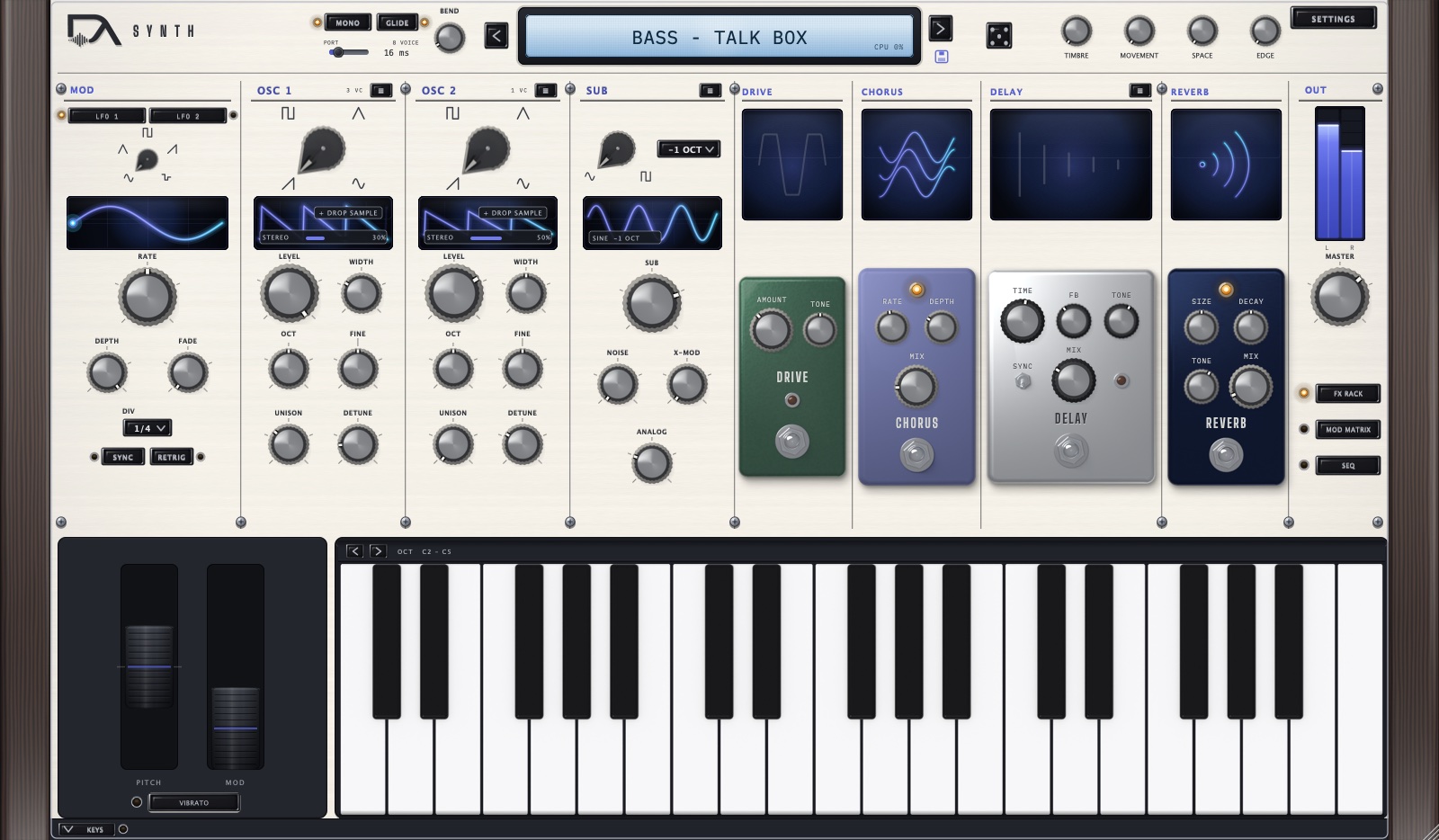
Four pedals, always in this order: Drive → Chorus → Delay → Reverb. The order is fixed by design — it is the order that flatters this instrument, and it keeps the rack readable. Each pedal has a footswitch that turns it on and off, and its lamp shows the state.
- Drive
- Amount and Tone. Post-filter grit, separate from the filter's own Drive.
- Chorus
- Rate, Depth, Mix.
- Delay
- Time (1–2000 ms) or, with SYNC on, a tempo division from 1/1 to 1/8 dotted. Plus Feedback, Tone and Mix.
- Reverb
- Size, Decay, Tone, Mix.
08Presets and the library
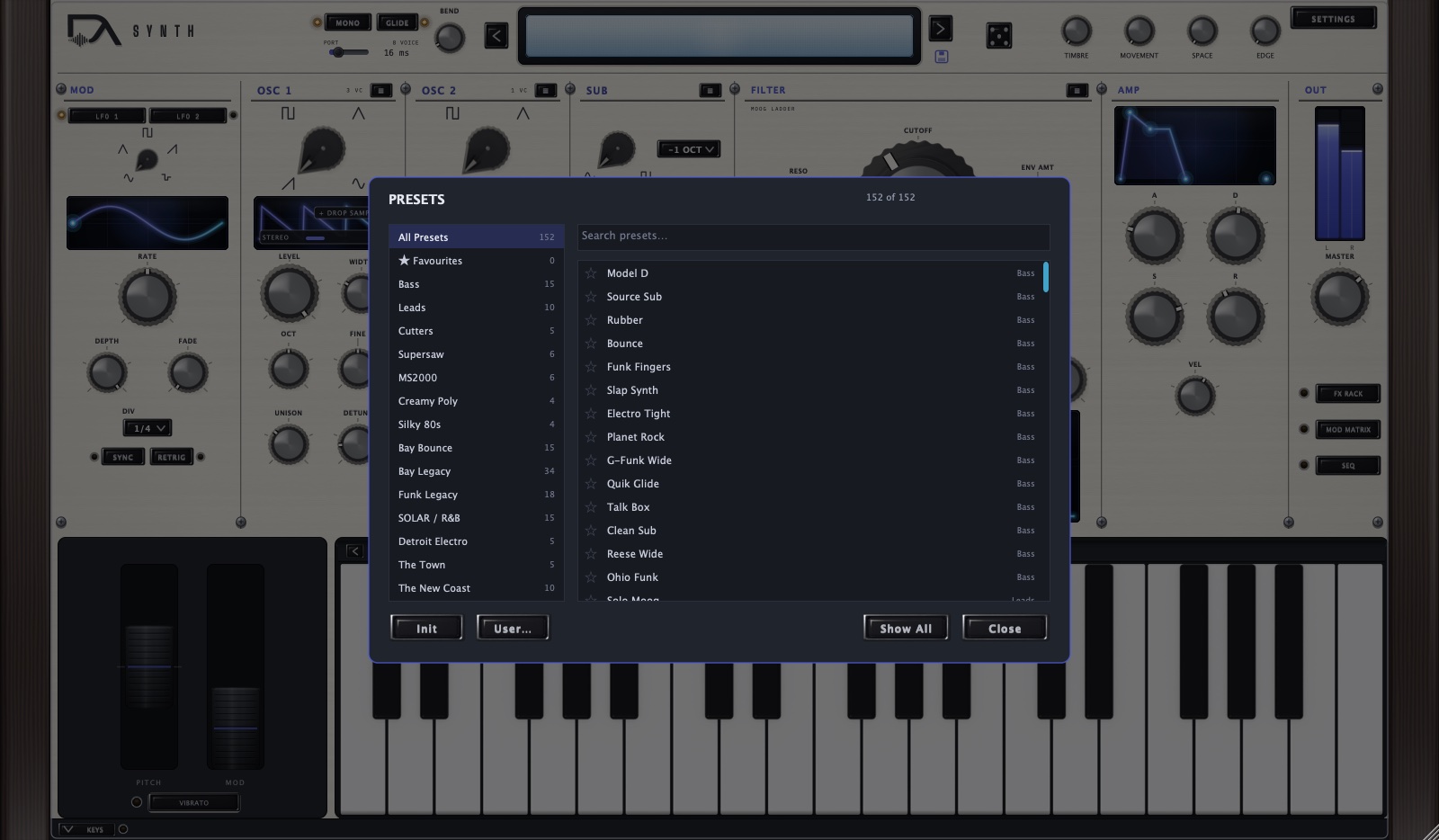
Click the display to open the browser. The left column lists All Presets, Favourites and every collection with its count; the search box filters as you type; the star on each row keeps a favourite. Init resets to a bare patch, and User… lists the patches you have saved.
The arrows beside the display step through your current filter, not the whole bank — filter to a collection, close the browser, and the arrows walk that collection.
What is in the library
153 sounds, built as collections rather than a bag of patches. The largest are Bay Legacy (34), Funk Legacy (18), SOLAR / R&B (15), Bay Bounce (15), Bass (15), The New Coast (11) and Leads (10), with smaller sets for Supersaw, MS2000, Creamy Poly, Silky 80s, Cutters, Detroit Electro and The Town.
Every patch follows the same performance conventions, so they respond the way you expect: velocity opens the filter and adds attack, the mod wheel adds vibrato or opens the filter on sustained sounds, and the four macros are mapped to that sound's most useful moves. Bass patches are mono-safe. Analog drift is on by default — ANALOG in the SUB panel sets how much the tuning and timing wander.
Changing patch while you play
Your sequence is yours, not the patch's. Changing sound leaves the sixteen steps, their chord types, and the state of the sequencer and chord memory exactly as you set them — so you can audition the library against a line you are working on and hear each sound in context. Init is the exception: it clears the sequence along with everything else, because it means a blank slate.
A preset only takes over what it explicitly carries. A handful set up the sequencer deliberately — The New Coast — Cell 1 ships an Am9 / Fmaj9 / G13 progression and starts it, so selecting it replaces your steps on purpose.
Saving your own
The disk icon beside the display saves the current patch, imports a patch file, or exports one to share. Saved patches appear under User… in the browser. Favourites are stored per user, by name, so they follow you between projects.
09Settings
Quality
Three settings, in the SETTINGS menu at the top right:
- Draft
- No oversampling of the nonlinear stages, 2× for FM. Lowest CPU — for arranging.
- Standard
- 2× nonlinear, 4× FM. The default, and clean for most work.
- High
- 4× nonlinear, 8× FM. The cleanest, and what the factory presets are voiced at — they force High when loaded so they sound the way they were designed.
Higher settings cost CPU and add a little latency, which your DAW compensates for automatically.
Themes
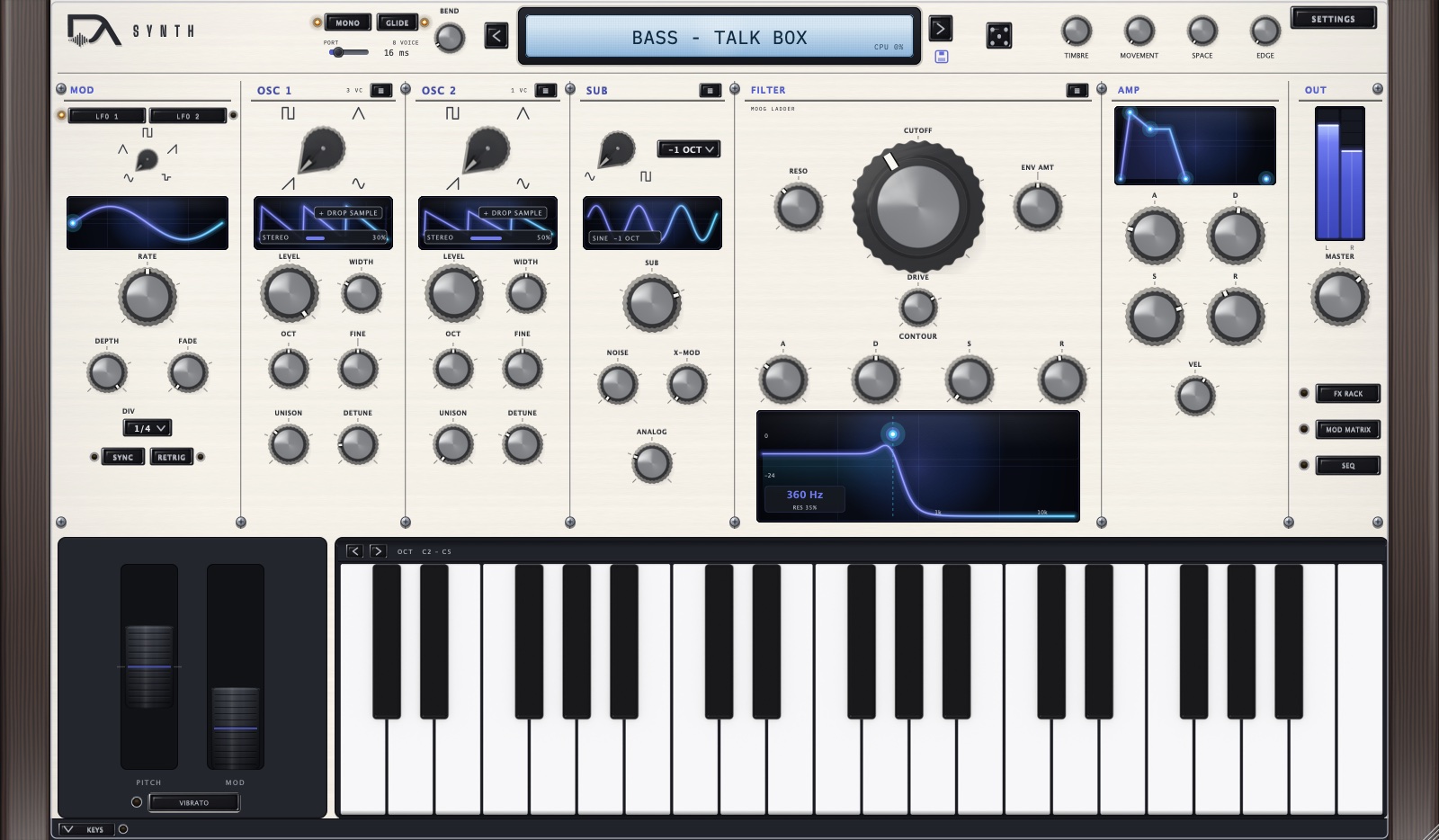
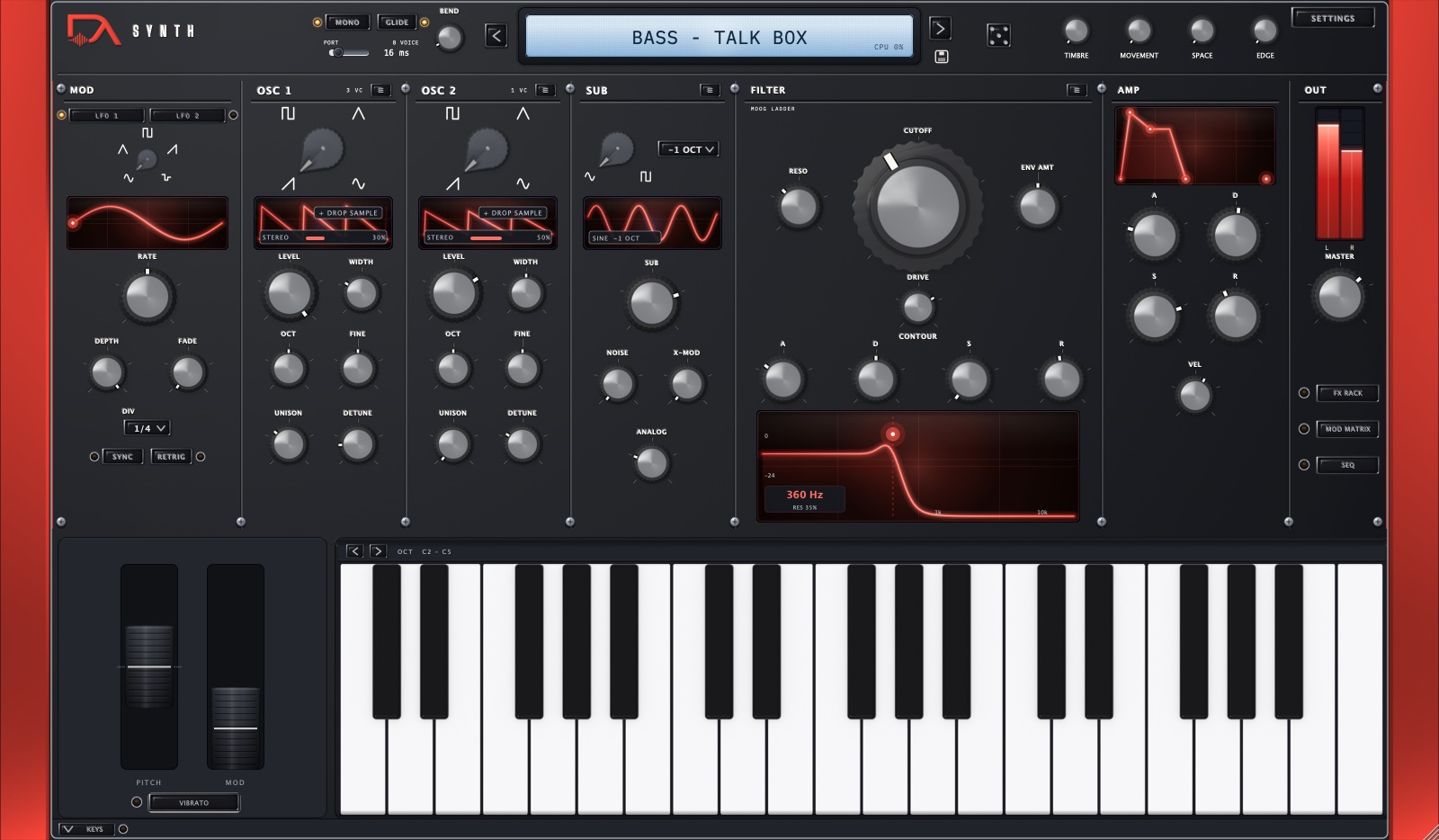
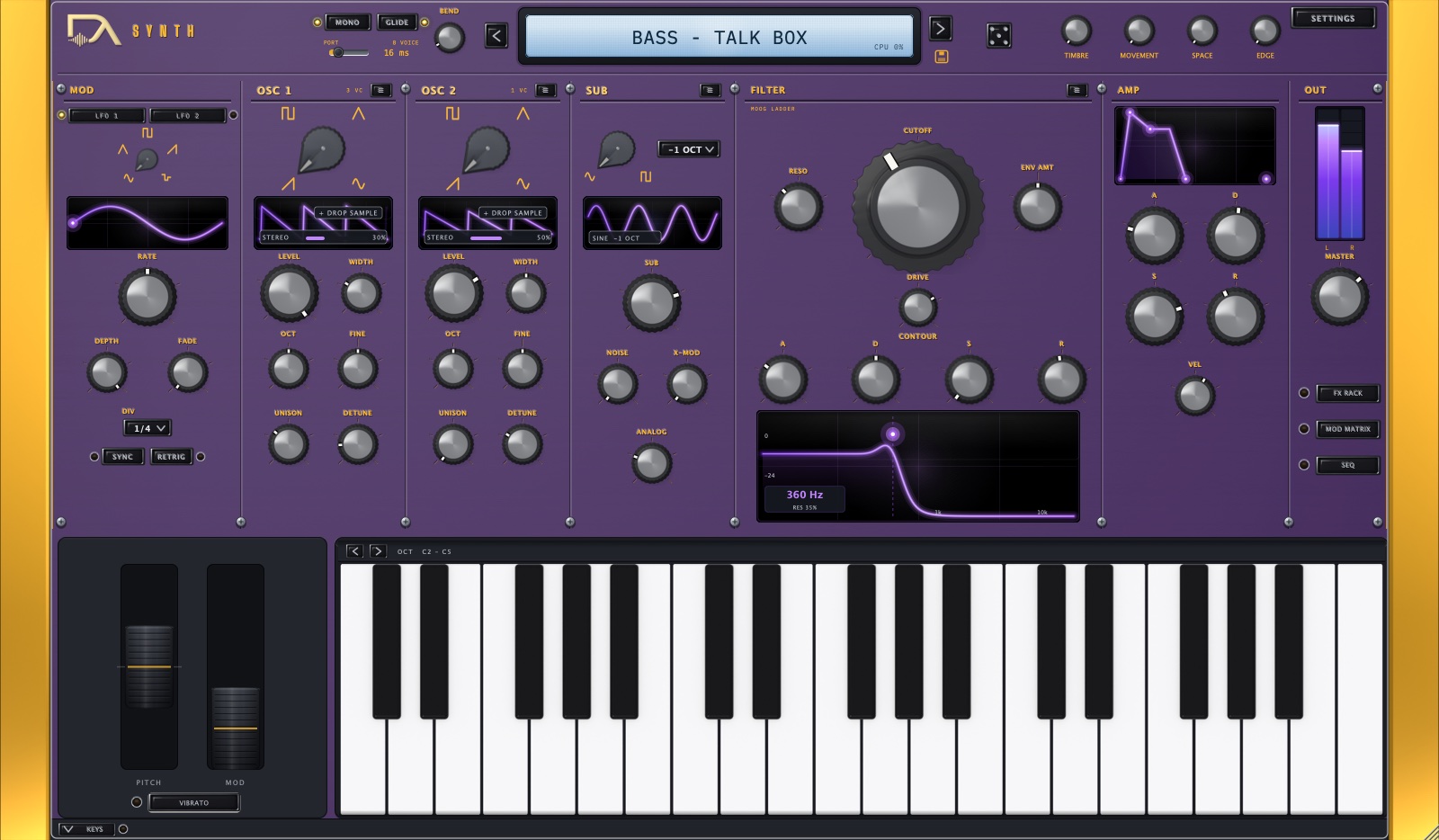
Four faceplates in the SETTINGS menu: DeAnalog, E-A-Ski, Amethyst and Sapphire. The theme is a personal preference, not part of a patch, so it stays where you set it across every project.
Window size
Drag any corner to resize; the aspect ratio stays locked. The size is remembered for next time, and is clamped to your display, so a window sized on a large monitor still opens sensibly on a laptop.
MIDI learn
Right-click almost any knob, switch or menu on the main panel and choose MIDI Learn, then move a control on your hardware. The SETTINGS menu holds the mapping manager, where you can review and clear what you have mapped. Mappings are saved with your session.
The keyboard
Click the keys to play without a controller. The < and > chips at the left of the octave strip shift the range, and KEYS in the footer folds the keyboard away when you want a shorter window.
10Known limits and FAQ
Short list, and worth reading — most support questions are here.
Eight voices
The synth plays eight notes at once. A ninth note steals the oldest. With unison stacked high this is deliberate: eight rich voices, not sixteen thin ones.
Chord memory does nothing in Mono or Legato
It is poly only — chords need voices. Turning CHORD on switches the voice mode to Poly for you, so this only bites when a patch you load is mono: there the patch's voice mode wins and the chord row greys out, reading CHORD: POLY ONLY. Your per-step chord types are still stored; they sound again as soon as you are back in Poly.
Chromatic arp order uses only your lowest note
The Chromatic order takes the lowest note you are holding and walks up in semitones, ignoring the rest. That is what it is for — the panel reads CHORD: LOWEST ONLY to remind you. Use another order to arpeggiate everything you hold. For the same reason Chromatic is unavailable while ROLL is on: it would discard the chord it was handed, and on the rootless voicings the note it kept would be the third.
The sequencer and arp need a running transport
Both wait for your DAW unless FREE is on. An armed but silent sequencer shows a breathing WAIT on its ON button. This is the single most common "it's broken" report, and it isn't.
Why does my host's preset menu show only one entry?
In Audio Unit hosts such as Logic, the plug-in's own preset menu lists a single entry rather than all 153. That is deliberate: the Audio Unit preset menu is a fragile mechanism for a bank this size, and we would rather it be empty than crash mid-session. Use the browser inside the plug-in — click the display. Your saved patches, favourites and collections all live there, and patches saved from the plug-in travel with your session as normal.
There is no undo
Loading a preset replaces everything you have dialled in, and there is no undo inside the plug-in. Save your patch before you go browsing. Your sequence is the exception — steps, chord types and the state of the sequencer survive a patch change, so browsing sounds does not cost you the line you were writing.
System requirements
- macOS
- 13.7 or later, Intel or Apple Silicon (universal).
- Formats
- Audio Unit and VST3, 64-bit.
- Uninstall
- Delete
DeAnalog.componentandDeAnalog.vst3from/Library/Audio/Plug-Ins. Your preferences live in~/Library/Analog Productions/DeAnalog/and your saved patches in~/Documents/DeAnalog/Patches.
11Parameter reference
Every parameter the plug-in exposes to your host for automation, read straight out of the shipping build rather than typed up by hand. Names are exactly what your DAW shows in its automation list.
Global 11
| Parameter | Type | Min | Default | Max | Values |
|---|---|---|---|---|---|
| Analog | continuous | 0 | 0.25 | 1 | |
| Bend Range | continuous | 0 | 2 | 24 | |
| FM (2->1) | continuous | 0 | 0 | 1 | |
| Glide | continuous | 0 | 0 | 2 | |
| Low Shelf | continuous | 0 | 0 | 9 | |
| Master | continuous | -60 | -6 | 6 | |
| Osc2 Sync | on/off | Off | Off | On | |
| Quality | list | Draft | Standard | High | Draft · Standard · High |
| Ring Mod | continuous | 0 | 0 | 1 | |
| Velocity | continuous | 0 | 0.6 | 1 | |
| Voice Mode | list | Poly | Poly | Legato | Poly · Mono · Legato |
Oscillators 20
| Parameter | Type | Min | Default | Max | Values |
|---|---|---|---|---|---|
| Osc1 Coarse | continuous | -12 | 0 | 12 | |
| Osc1 Detune | continuous | 0 | 0.3 | 1 | |
| Osc1 Fine | continuous | -100 | 0 | 100 | |
| Osc1 Level | continuous | 0 | 0.8 | 1 | |
| Osc1 Mode | list | Waveform | Waveform | Single-Cycle | Waveform · Single-Cycle |
| Osc1 Octave | continuous | -2 | 0 | 2 | |
| Osc1 PWM | continuous | 0.05 | 0.5 | 0.95 | |
| Osc1 Spread | continuous | 0 | 0.5 | 1 | |
| Osc1 Unison | continuous | 1 | 1 | 7 | |
| Osc1 Wave | list | Saw | Saw | Sine | Saw · Pulse · Triangle · Sine |
| Osc2 Coarse | continuous | -12 | 0 | 12 | |
| Osc2 Detune | continuous | 0 | 0.3 | 1 | |
| Osc2 Fine | continuous | -100 | 0 | 100 | |
| Osc2 Level | continuous | 0 | 0 | 1 | |
| Osc2 Mode | list | Waveform | Waveform | Single-Cycle | Waveform · Single-Cycle |
| Osc2 Octave | continuous | -2 | 0 | 2 | |
| Osc2 PWM | continuous | 0.05 | 0.5 | 0.95 | |
| Osc2 Spread | continuous | 0 | 0.5 | 1 | |
| Osc2 Unison | continuous | 1 | 1 | 7 | |
| Osc2 Wave | list | Saw | Saw | Sine | Saw · Pulse · Triangle · Sine |
Sub & noise 5
| Parameter | Type | Min | Default | Max | Values |
|---|---|---|---|---|---|
| Noise Level | continuous | 0 | 0 | 1 | |
| Noise Type | list | White | White | Pink | White · Pink |
| Sub Level | continuous | 0 | 0 | 1 | |
| Sub Oct | list | -1 | -1 | -2 | -1 · -2 |
| Sub Wave | list | Sine | Square | Square | Sine · Square |
Filter 6
| Parameter | Type | Min | Default | Max | Values |
|---|---|---|---|---|---|
| Cutoff | continuous | 20 | 10000 | 20000 | |
| Drive | continuous | 0 | 0 | 1 | |
| Env2->Cutoff | continuous | -1 | 0 | 1 | |
| Filter Type | list | LP24 | LP24 | BP | LP24 · LP12 · HP · BP |
| Key Track | continuous | 0 | 0 | 1 | |
| Resonance | continuous | 0 | 0.1 | 1 |
Envelopes 8
| Parameter | Type | Min | Default | Max | Values |
|---|---|---|---|---|---|
| Amp Attack | continuous | 0.001 | 0.005 | 4 | |
| Amp Decay | continuous | 0.001 | 0.15 | 4 | |
| Amp Release | continuous | 0.001 | 0.25 | 4 | |
| Amp Sustain | continuous | 0 | 0.85 | 1 | |
| Filt Attack | continuous | 0.001 | 0.01 | 4 | |
| Filt Decay | continuous | 0.001 | 0.2 | 4 | |
| Filt Release | continuous | 0.001 | 0.25 | 4 | |
| Filt Sustain | continuous | 0 | 0 | 1 |
LFOs 14
| Parameter | Type | Min | Default | Max | Values |
|---|---|---|---|---|---|
| LFO1 Depth | continuous | 0 | 1 | 1 | |
| LFO1 Div | list | 1/1 | 1/4 | 1/16T | 1/1 · 1/2 · 1/4 · 1/8 · 1/16 · 1/8T · 1/16T |
| LFO1 Fade | continuous | 0 | 0 | 5 | |
| LFO1 Rate | continuous | 0.01 | 2 | 40 | |
| LFO1 Retrig | on/off | Off | Off | On | |
| LFO1 Shape | list | Sine | Sine | S&H | Sine · Triangle · Saw · Square · S&H |
| LFO1 Sync | on/off | Off | Off | On | |
| LFO2 Depth | continuous | 0 | 1 | 1 | |
| LFO2 Div | list | 1/1 | 1/4 | 1/16T | 1/1 · 1/2 · 1/4 · 1/8 · 1/16 · 1/8T · 1/16T |
| LFO2 Fade | continuous | 0 | 0 | 5 | |
| LFO2 Rate | continuous | 0.01 | 2 | 40 | |
| LFO2 Retrig | on/off | Off | Off | On | |
| LFO2 Shape | list | Sine | Sine | S&H | Sine · Triangle · Saw · Square · S&H |
| LFO2 Sync | on/off | Off | Off | On |
Mod matrix 24
| Parameter | Type | Min | Default | Max | Values |
|---|---|---|---|---|---|
| Mod1 Amt | continuous | -1 | 0 | 1 | |
| Mod1 Dst | list | Osc1 Pitch | Osc1 Pitch | Osc2 Sync | Osc1 Pitch · Osc2 Pitch · Osc1 Level · Osc2 Level · PWM · FM Amount · Cutoff · Resonance · Drive · Amp · Pan · LFO1 Rate · LFO1 Depth · LFO2 Rate · LFO2 Depth · Macro1 · Macro2 · Macro3 · Macro4 · Osc2 Sync |
| Mod1 Src | list | Env1 | None | None | Env1 · Env2 · LFO1 · LFO2 · Velocity · ModWheel · Aftertouch · KeyTrack · Macro1 · Macro2 · Macro3 · Macro4 · None |
| Mod2 Amt | continuous | -1 | 0 | 1 | |
| Mod2 Dst | list | Osc1 Pitch | Osc1 Pitch | Osc2 Sync | Osc1 Pitch · Osc2 Pitch · Osc1 Level · Osc2 Level · PWM · FM Amount · Cutoff · Resonance · Drive · Amp · Pan · LFO1 Rate · LFO1 Depth · LFO2 Rate · LFO2 Depth · Macro1 · Macro2 · Macro3 · Macro4 · Osc2 Sync |
| Mod2 Src | list | Env1 | None | None | Env1 · Env2 · LFO1 · LFO2 · Velocity · ModWheel · Aftertouch · KeyTrack · Macro1 · Macro2 · Macro3 · Macro4 · None |
| Mod3 Amt | continuous | -1 | 0 | 1 | |
| Mod3 Dst | list | Osc1 Pitch | Osc1 Pitch | Osc2 Sync | Osc1 Pitch · Osc2 Pitch · Osc1 Level · Osc2 Level · PWM · FM Amount · Cutoff · Resonance · Drive · Amp · Pan · LFO1 Rate · LFO1 Depth · LFO2 Rate · LFO2 Depth · Macro1 · Macro2 · Macro3 · Macro4 · Osc2 Sync |
| Mod3 Src | list | Env1 | None | None | Env1 · Env2 · LFO1 · LFO2 · Velocity · ModWheel · Aftertouch · KeyTrack · Macro1 · Macro2 · Macro3 · Macro4 · None |
| Mod4 Amt | continuous | -1 | 0 | 1 | |
| Mod4 Dst | list | Osc1 Pitch | Osc1 Pitch | Osc2 Sync | Osc1 Pitch · Osc2 Pitch · Osc1 Level · Osc2 Level · PWM · FM Amount · Cutoff · Resonance · Drive · Amp · Pan · LFO1 Rate · LFO1 Depth · LFO2 Rate · LFO2 Depth · Macro1 · Macro2 · Macro3 · Macro4 · Osc2 Sync |
| Mod4 Src | list | Env1 | None | None | Env1 · Env2 · LFO1 · LFO2 · Velocity · ModWheel · Aftertouch · KeyTrack · Macro1 · Macro2 · Macro3 · Macro4 · None |
| Mod5 Amt | continuous | -1 | 0 | 1 | |
| Mod5 Dst | list | Osc1 Pitch | Osc1 Pitch | Osc2 Sync | Osc1 Pitch · Osc2 Pitch · Osc1 Level · Osc2 Level · PWM · FM Amount · Cutoff · Resonance · Drive · Amp · Pan · LFO1 Rate · LFO1 Depth · LFO2 Rate · LFO2 Depth · Macro1 · Macro2 · Macro3 · Macro4 · Osc2 Sync |
| Mod5 Src | list | Env1 | None | None | Env1 · Env2 · LFO1 · LFO2 · Velocity · ModWheel · Aftertouch · KeyTrack · Macro1 · Macro2 · Macro3 · Macro4 · None |
| Mod6 Amt | continuous | -1 | 0 | 1 | |
| Mod6 Dst | list | Osc1 Pitch | Osc1 Pitch | Osc2 Sync | Osc1 Pitch · Osc2 Pitch · Osc1 Level · Osc2 Level · PWM · FM Amount · Cutoff · Resonance · Drive · Amp · Pan · LFO1 Rate · LFO1 Depth · LFO2 Rate · LFO2 Depth · Macro1 · Macro2 · Macro3 · Macro4 · Osc2 Sync |
| Mod6 Src | list | Env1 | None | None | Env1 · Env2 · LFO1 · LFO2 · Velocity · ModWheel · Aftertouch · KeyTrack · Macro1 · Macro2 · Macro3 · Macro4 · None |
| Mod7 Amt | continuous | -1 | 0 | 1 | |
| Mod7 Dst | list | Osc1 Pitch | Osc1 Pitch | Osc2 Sync | Osc1 Pitch · Osc2 Pitch · Osc1 Level · Osc2 Level · PWM · FM Amount · Cutoff · Resonance · Drive · Amp · Pan · LFO1 Rate · LFO1 Depth · LFO2 Rate · LFO2 Depth · Macro1 · Macro2 · Macro3 · Macro4 · Osc2 Sync |
| Mod7 Src | list | Env1 | None | None | Env1 · Env2 · LFO1 · LFO2 · Velocity · ModWheel · Aftertouch · KeyTrack · Macro1 · Macro2 · Macro3 · Macro4 · None |
| Mod8 Amt | continuous | -1 | 0 | 1 | |
| Mod8 Dst | list | Osc1 Pitch | Osc1 Pitch | Osc2 Sync | Osc1 Pitch · Osc2 Pitch · Osc1 Level · Osc2 Level · PWM · FM Amount · Cutoff · Resonance · Drive · Amp · Pan · LFO1 Rate · LFO1 Depth · LFO2 Rate · LFO2 Depth · Macro1 · Macro2 · Macro3 · Macro4 · Osc2 Sync |
| Mod8 Src | list | Env1 | None | None | Env1 · Env2 · LFO1 · LFO2 · Velocity · ModWheel · Aftertouch · KeyTrack · Macro1 · Macro2 · Macro3 · Macro4 · None |
Macros 4
| Parameter | Type | Min | Default | Max | Values |
|---|---|---|---|---|---|
| Macro 1 | continuous | 0 | 0 | 1 | |
| Macro 2 | continuous | 0 | 0 | 1 | |
| Macro 3 | continuous | 0 | 0 | 1 | |
| Macro 4 | continuous | 0 | 0 | 1 |
Chord memory 9
| Parameter | Type | Min | Default | Max | Values |
|---|---|---|---|---|---|
| Chord 7th | on/off | Off | Off | On | |
| Chord Arp | on/off | Off | Off | On | |
| Chord Fixed Type | on/off | Off | Off | On | |
| Chord Memory | on/off | Off | Off | On | |
| Chord Steps | on/off | Off | On | On | |
| Chord Strum | continuous | 0 | 0 | 60 | |
| Chord Type | list | Maj | Maj | 13 | Maj · Min · 7 · Maj7 · Min7 · Sus2 · Sus4 · Add9 · 6 · 5 (Power) · m9 · maj9 · 9 · 13 |
| Chord Voicing | list | Root | Root | Open | Root · 1st Inv · 2nd Inv · Open |
| Strum Down | on/off | Off | Off | On |
Sequencer & arp 16
| Parameter | Type | Min | Default | Max | Values |
|---|---|---|---|---|---|
| Arp Latch | on/off | Off | Off | On | |
| Arp Octaves | continuous | 1 | 1 | 4 | |
| Arp Order | list | Up | Up | Chromatic | Up · Down · Up-Down · Down-Up · As Played · Random · Chromatic |
| Key Transpose | on/off | Off | Off | On | |
| Scale Lock | on/off | Off | Off | On | |
| Scale Root | list | C | C | B | C · C# · D · D# · E · F · F# · G · G# · A · A# · B |
| Scale Type | list | Major | Nat Minor | Chromatic | Major · Nat Minor · Harm Minor · Dorian · Phrygian · Mixolydian · Lydian · Min Pent · Maj Pent · Chromatic |
| Seq Direction | list | Up | Up | As Entered | Up · Down · Up-Down · Random · As Entered |
| Seq Free Run | on/off | Off | Off | On | |
| Seq Gate | continuous | 0.05 | 0.5 | 1 | |
| Seq Length | continuous | 1 | 16 | 16 | |
| Seq Lock To Host | on/off | Off | Off | On | |
| Seq Mode | list | Step | Step | Arp | Step · Arp |
| Seq On | on/off | Off | Off | On | |
| Seq Rate | list | 1/8 | 1/16 | 1/32 | 1/8 · 1/8D · 1/8T · 1/16 · 1/16T · 1/32 |
| Seq Swing | continuous | 0 | 0 | 0.75 |
FX rack 19
| Parameter | Type | Min | Default | Max | Values |
|---|---|---|---|---|---|
| Chorus Depth | continuous | 0 | 0.3 | 1 | |
| Chorus Mix | continuous | 0 | 0.4 | 1 | |
| Chorus On | on/off | Off | Off | On | |
| Chorus Rate | continuous | 0.01 | 0.8 | 10 | |
| Delay Div | list | 1/1 | 1/8 | 1/8D | 1/1 · 1/2 · 1/4 · 1/8 · 1/16 · 1/8T · 1/16T · 1/4D · 1/8D |
| Delay Feedback | continuous | 0 | 0.35 | 0.95 | |
| Delay Mix | continuous | 0 | 0.3 | 1 | |
| Delay On | on/off | Off | Off | On | |
| Delay Sync | on/off | Off | Off | On | |
| Delay Time | continuous | 1 | 350 | 2000 | |
| Delay Tone | continuous | 0 | 0.6 | 1 | |
| Drive Amount | continuous | 0 | 0.3 | 1 | |
| Drive On | on/off | Off | Off | On | |
| Drive Tone | continuous | 0 | 0.5 | 1 | |
| Reverb Decay | continuous | 0 | 0.5 | 1 | |
| Reverb Mix | continuous | 0 | 0.25 | 1 | |
| Reverb On | on/off | Off | Off | On | |
| Reverb Size | continuous | 0 | 0.5 | 1 | |
| Reverb Tone | continuous | 0 | 0.6 | 1 |